Save up to 71%
Weekly Deals
on select tech deals.
Save up to 71% on select HP tech, FREE shipping storewide.
Financing options available for all credit scores.

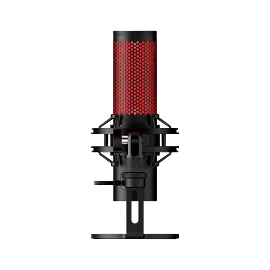
HyperX QuadCast Microphone

Other offers available with the product:

FREE Storewide Shipping

Weekly Deals

Product # 4P5P6A6#ABA
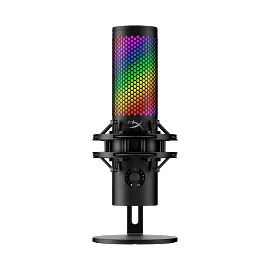
  • Built-in anti-vibration shock mount
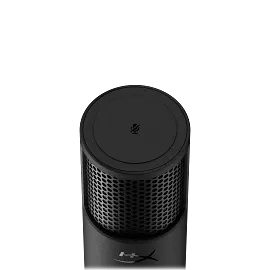
  • Tap-to-Mute Sensor with LED indicator
  • Stereo, Omnidirectional, Cardioid, BidirectionalSee all Specs

3% back in HP Rewards

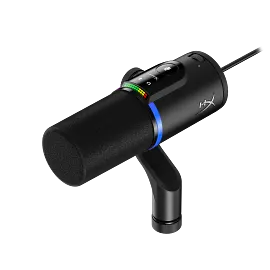
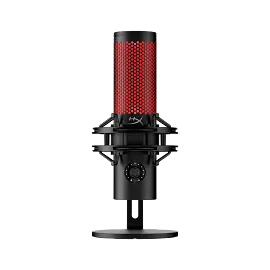
The HyperX QuadCast™ is the ideal all-inclusive standalone microphone for the aspiring streamer or podcaster looking for a condenser mic with quality sound. QuadCast comes with its own anti-vibration shock mount to help reduce the rumbles of daily life and a built-in pop filter to muffle pesky percussive sounds. Instantly know your mic status with the LED indicator, and simply tap-to-mute to avoid awkward broadcasting accidents. Select between the four polar patterns (stereo, omnidirectional, cardioid, bidirectional) and use the conveniently-located gain control dial to quickly adjust your mic input sensitivity. The included mount adapter that fits both 3/8” and 5/8” thread sizes and is compatible with most stands. Monitor your mic input with the built-in headphone jack, and QuadCast is certified by Discord and TeamSpeak™ so you can ensure that your microphone is broadcasting loud and clear for all your followers and listeners. Whether you’re plugging into a PC, PS5™, PS4™, or Mac® you’ll be able to deliver quality sound to anyone tuning in.

Built-in anti-vibration shock mount

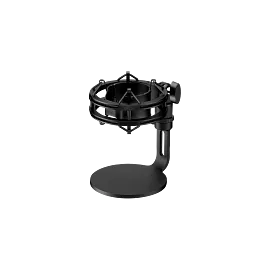
Isolate the mic and suppress the sound of unintentional rumbles and bumps with the elastic rope suspension.

Tap-to-mute sensor with LED status indicator

Use the convenient tap-to-mute functionality to prevent an audio accident along with the help of the LED mic status indicator. If the light is on, the mic is active, if the light is off, the mic is muted.

Four selectable polar patterns

Choose between four polar patterns (stereo, omnidirectional, cardioid, bidirectional) to optimize your broadcast setup and keep the focus on the sounds you want to be heard.

Mic mount adapter included

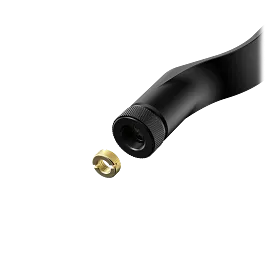
Versatile adapter fits 3/8 inch and 5/8 inch threaded setups, so it can be mounted onto most mic stands or boom arms[1].

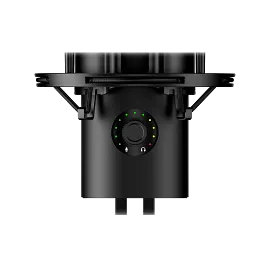
Convenient gain control

Easily adjust your mic sensitivity by turning the dial at the bottom of the QuadCast.

Built-in pop filter

The internal pop filter will help smooth out some of those pesky percussive noises that periodically punctuate your speech.

Monitor mic input through the headphone jack

Ensure that you’re sounding the way you want by monitoring your sound with the 3.5mm headphone jack.

Multi-platform, multi-program compatible

One microphone for streaming on PC, PS5™, PS4™, and Mac®. Clear voice quality with excellent sound for clear communication. QuadCast is Discord and TeamSpeak™ certified, and is compatible with most major broadcast software, like OBS Studio and XSplit.

Technical Specs

Color

Black

Total Harmonic Distortion

≤ 0.05% (1kHz/0dBFS)

Noise (RMS) (Headphone)

≤-95dBFS (A-weighted)

Noise (RMS) (Microphone)

≤-95dBFS (A-weighted)

Connection Type

USB Mini-B, 3.5mm headphone output

Cable length

9.84ft

Element

Three 14mm electret condenser capsules

Frequency Response

20Hz - 20kHz

Sampling Rates

48kHz, 44.1kHz, 32kHz, 16kHz, 8kHz

Sensitivity - Microphone

-36dB (1V/Pa at 1kHz)

USB

USB 2.0 (full speed)

Polar Pattern

Stereo, Omnidirectional, Cardioid, Bidirectional

Power Consumption

5V 125mA

Compatibility

PC, PS5™, PS4™, Mac®

Dimensions (W X D X H)

5.05 x 4 x 9.82 in

Weight

Weight (Microphone): 0.55lb

Warranty

2 year

What's in the box

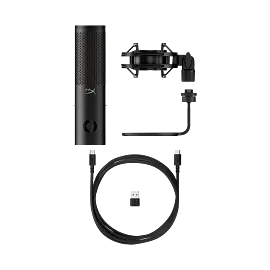
Gaming Microphone, USB Cable, Mount Adapter, Quick Start Guide

Reviews and Q&A

HyperX QuadCast Microphone is rated 4.5 out of 5 by 281.
  • y_2026, m_3, d_4, h_9
  • bvseo_bulk, prod_bvrr, vn_bulk_3.0.42
  • cp_1, bvpage1
  • co_hasreviews, tv_172, tr_109
  • loc_en_US, sid_4P5P6A6, prod, sort_[SortEntry(order=SUBMISSION_TIME, direction=DESCENDING)]
  • clientName_hp
  • bvseo_sdk, java_sdk, bvseo-4.0.0
  • CLOUD, getAggregateRating, 3ms
  • REVIEWS, PRODUCT
Rated 5 out of 5 by Anonymous from My quadcast experience. Unbeatable value and reliability, the HyperX Quad cast provides a surreal level of audio quality without breaking the bank. All while you still have the option to upgrade with boom arms and other accessories to increase the user experience. My most recent purchase of the HyperX was me buying my friend a new microphone for Christmas, which by the way was on an amazing sale! 70 dollars off? Where else am I going to get prices like that! And the reason his old microphone died was because his cat chewed through the cable.... But that's not a problem for the HyperX! The cable this thing comes with is tough as nails! Overall the HyperX Quad cast is the Number ONE microphone I would recommend to any PC gamer looking for a high quality microphone that won't shatter the bank. I personally love mine hence why I bought my friend one.
Date published: 2026-01-05
Rated 5 out of 5 by Customer2545 from It looks Nice in Person Looks Good Inperson
Date published: 2025-12-30
Rated 1 out of 5 by Disappointed Jim from Order nightmare, not worth the hassle Purchase at your own risk. (Customer service complaints removed)
Date published: 2025-11-02
Rated 4 out of 5 by Some Guy on a Computer from Functionally fantastic but glitchy RGB Microphone works great and is fantastic at picking up sound in the specified direction, however its RGB controlling app that Hyperx recommended does not function as intended sometimes. I frequently see glitches of being unable to change the color or pattern to sometimes not having any color displayed at all. the microphone works great though.
Date published: 2025-10-23
Rated 5 out of 5 by PSICOJARS from Good Product Excelenten
Date published: 2025-10-02
Rated 2 out of 5 by tynelly from Hyper X mic Decent pick up but has a little delay, doesnt suppress background sound
Date published: 2025-09-28
Rated 4 out of 5 by Anonymous from A great product. The microphone works great, very clear. Extremely easy to install and works on multiple platforms with a simple move of the usb cord. Very cool lighting that adds to any setup to give it some flair. Very happy with performance and speed of shipping/packaging.
Date published: 2025-08-05
Rated 4 out of 5 by Kenski from HyperX QuadCast 2 S Black Great product and works well colors are nice and sharp defiantly recommend if you need a desk mic.
Date published: 2025-06-27
  • y_2026, m_3, d_4, h_9
  • bvseo_bulk, prod_bvrr, vn_bulk_3.0.42
  • cp_1, bvpage1
  • co_hasreviews, tv_172, tr_109
  • loc_en_US, sid_4P5P6A6, prod, sort_[SortEntry(order=SUBMISSION_TIME, direction=DESCENDING)]
  • clientName_hp
  • bvseo_sdk, java_sdk, bvseo-4.0.0
  • CLOUD, getReviews, 4ms
  • REVIEWS, PRODUCT

Is this something you vocals use for singing or no?

Asked by: Smurf17
The HyperX QuadCast S - USB Microphone is designed for gaming, podcasts, zoom calls, etc. This is not designed for professional vocal(singing) recording.
Answered by: HP Team Grant
Date published: 2023-05-06

is this mic compatible with HP Elite Desk Mini ... for Radio Broadcasting with RadioJar

Asked by: DJ A
This HyperX SoloCast - USB Microphone will be compatible with PC, PS5™, PS4™, and Mac®. For questions about third-party software compatibility please contact the software manufacturer.
Answered by: HP Team Grant
Date published: 2023-06-01

How does the microphone work with a PC

Asked by: cassie24
Thanks for your question. The microphone will connect to a USB port on your computer. Whatever software you use to record should recognize the microphone and you can begin recording.
Answered by: HP Team-Ryan
Date published: 2025-03-05

on my inspiron 15 35 35 a little circle over camera fell off now picture is very fuzzy can i buy a replacement lens without replacing whole camera?

Asked by: pkelly
We are sorry to hear about your issue. We recommend reaching out to Dell Support for further assistance.
Answered by: HP Team Cheri
Date published: 2025-06-01

How do you turn the d*** thing on

Asked by: Bodo124
Thank you for your question! Make sure you are using a direct USB connection to the host PC. Then touch the top of the microphone to unmute.
Answered by: HP Team Grant
Date published: 2024-07-25

Is this compatible with Mac OS?

Asked by: C-Note
Thanks for your question. The HyperX DuoCast is compatible with macOS.
Answered by: HP Team-Ryan
Date published: 2024-12-26

Can I change the colors of the rgb on the frost or is it only blue?

Asked by: Sophia.

I have HP Elite Desk Mini Computer and Radio Broadcast via RadioJar with ZealSoft microphone . I have no Microphone Settings when open the Virtual Studio. Can anyone help me figure this out Thanks

Asked by: DJ A
  • y_2026, m_3, d_4, h_9CST
  • bvseo_bulk, prod_bvqa, vn_bulk_3.0.42
  • cp_1, bvpage1
  • co_hasquestionsanswers, tq_10
  • loc_en_US, sid_4P5P6A6, prod, sort_[SortEntry(order=NUM_ANSWERS, direction=DESCENDING)]
  • clientName_hp
  • bvseo_sdk, java_sdk, bvseo-4.0.0
  • CLOUD, getContent, 2ms
  • QUESTIONS, PRODUCT

Similar Products

Return and exchange information
Most items may be returned within 30 days of delivery. A restocking fee of up to 15% of the purchase price may be deducted from your refund for returned items, except where prohibited by law. No restocking fee applies to defective or incorrect items. A restocking fee is not applicable for printers, ink, toner, paper, care packs, software and services. For details, please visit: https://www.hp.com/us-en/shop/cv/returnsandexchanges
Country/Region :   United States